
PhoFilter - Multilayer Filters2.44.264 - App Store
You'll be able to see results in few seconds.
Publisher Description
Create new filters to enhance your images through PhoFilter with 263 filters and more to be updated. Combine 263 and more filters to create a filter that can be uniquely yours and, Share your creative filters with your friends. New filters can be made by mixing up to 6 filters.
Through Fan Filter page on Facebook, you can share YOUR filter with your friends and also use filters that were created by your friends.
Tired of editing images one by one?
Then, this is a right application for you.
With PhoFilter, you can edit and share maximum 12 pictures ALL AT ONCE!
Combine various filters to create your own customized filter.
You can leave photographs of your precious moments with more livelihood and amelioration.
---> Tutorial videos
---> http://vimeo.com/PhoFilter
Features >
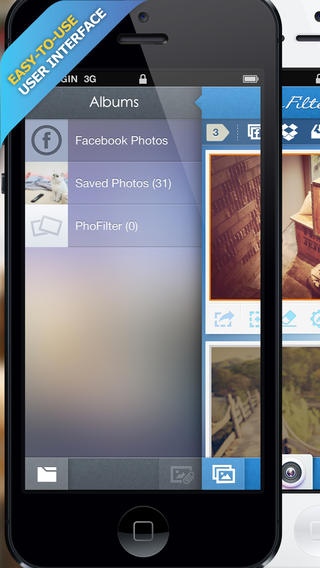
Highly optimized Easy-to-use User Interface.(Optimized user interfaces for both iPad and iPhone/iPod Touch devices - Universal)
Access to all pages with use of left and right button located at the bottom of the screen
Currently 80 Effects Filters provided.
Currently 92 Textures Filters provided.
Currently 91 Themes Filters provided.
Unlimited customized filters (Filters created or, downloaded filters from Fan Filter)
Edit individual filters.
Change the order of the filters
Maximum 6 filters appliable.
Create new filters through grouping of applied filters (Saved to custom filters)
Edit, Deltete and Re-order layers of grouped custom filters
Edit, Delete and Change the name of custom Filter
Share custom Filters with Before&After images on SNS (Twitter, Facebook, Album, Email)
Share custom Filters with Before&After images on Facebook fan page, Fan Filter
Add Filters on Fan Filter to custom Filter.Changing and Editing is supported.
Change Privacy Settings regarding exposure to my Facebook Page of shared filters on Fan Filter
Delete shared filters on Fan Filter
Edit Preview Thumbnail Images of Filter
A variety of Blend Morde on Texture Filters is supported.
Edit/Modify themes filter
Frame Filter including QR Code Filter, etc. provided.
Date Filter provided (Records current time, time and date of photo)
Text Filter provided (For Inserting texts to photo)
Location Filter to apply location information of photo provided (Usable when location information is included in photo)
Palette to change Texts and Frame colors
Alpha support of RGB Color(16,581,375 colors)
Save/Delete most-used colors
Edit Texts
Variety of Font styles provided (including Na-num font by NHN)
Change the size and location of Frames and Texts
Flexible mobility according to the image ratios
Taking pictures, Importing maximum 12 pictures from Camera Roll (Album) or Facebook.
Sharing Images (Instagram, Pinterest, Dropbox, Twitter, Facebook, Weibo, Save to Album, Email, Path, etc.)
Sharing up to 12 images at once (Facebook, Dropbox, Cameral Roll)
Zoom in/out of imported images by tapping twice
Creating Filters applied to Image
Deleting Filters applied to Images a once
Rotation, editing of size and location of individual imported images
Deletion of Imported Images
Camera function
Automatic Import of pictures taken by camera
Saving both Original and Edited Images to album
Apply Cutoms Filters to maximum 12 images simultaneously
Copy and Pasting applied Filters
Copy and Pasting Images
Save images to the Gallery with applied filters
Add/Remove Gallery Albums
Pass-code locked private album
Changing password of private album
Delete Album
Delete Images in the Album
Import images with applied Filters from Albums
Requires iOS 6.0 or later. Compatible with iPhone, iPad, and iPod touch.
About PhoFilter - Multilayer Filters
The company that develops PhoFilter - Multilayer Filters is Gyeong-Seop No. The latest version released by its developer is 2.44.264.
To install PhoFilter - Multilayer Filters on your iOS device, just click the green Continue To App button above to start the installation process. The app is listed on our website since 2013-05-11 and was downloaded 0 times. We have already checked if the download link is safe, however for your own protection we recommend that you scan the downloaded app with your antivirus. Your antivirus may detect the PhoFilter - Multilayer Filters as malware if the download link is broken.
How to install PhoFilter - Multilayer Filters on your iOS device:
- Click on the Continue To App button on our website. This will redirect you to the App Store.
- Once the PhoFilter - Multilayer Filters is shown in the iTunes listing of your iOS device, you can start its download and installation. Tap on the GET button to the right of the app to start downloading it.
- If you are not logged-in the iOS appstore app, you'll be prompted for your your Apple ID and/or password.
- After PhoFilter - Multilayer Filters is downloaded, you'll see an INSTALL button to the right. Tap on it to start the actual installation of the iOS app.
- Once installation is finished you can tap on the OPEN button to start it. Its icon will also be added to your device home screen.
Program Details
System requirements
Download information
Pricing
Version History
version 2.44.264
posted on 2013-05-11
Disclaimer
Official App Store Link
We do not host PhoFilter - Multilayer Filters on our servers. We did not scan it for viruses, adware, spyware or other type of malware. This app is hosted by Apple and passed their terms and conditions to be listed there. We recommend caution when installing it.
The App Store link for PhoFilter - Multilayer Filters is provided to you by apps112.com without any warranties, representations or guarantees of any kind, so access it at your own risk.
If you have questions regarding this particular app contact the publisher directly. For questions about the functionalities of apps112.com contact us.
